

While travelling for business or working remotely, you may need to access your QuickBooks company file. In such situations, it is not possible to access your accounting data locked on an office computer. We have seen businesses losing opportunities and missing deadlines due to this inaccessibility. In order to solve this issue, we have launched QuickBooks Enterprise Hosting. It helps to move your accounting software to the cloud, giving you secure access from anywhere with an internet connection.
Our team has helped hundreds of businesses transition to Enterprise Hosting and has seen how it transforms business operations. In this detailed guide, we have provided all the details you need to know about installation, setup, features, and pricing, so that you can decide whether cloud hosting is the right choice for your business.
What is QuickBooks Enterprise Hosting?
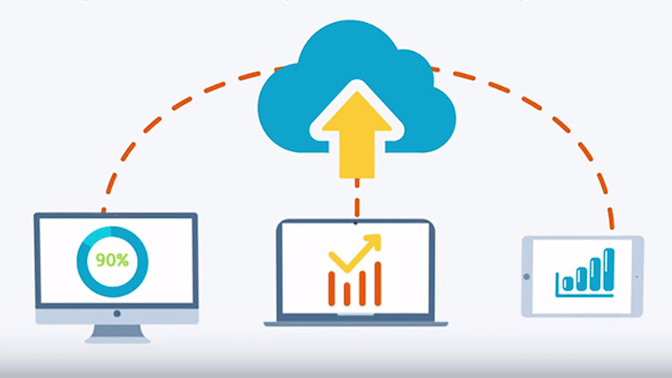
QuickBooks Enterprise Hosting transforms your desktop-based QuickBooks Enterprise Software into a cloud-accessible platform by installing it on secure remote servers maintained by hosting providers. With this setup, you can access your company file and critical financial data from anywhere. Here’s how the process works:
- The QuickBooks Enterprise application installs on a hosting provider’s remote server.
- Your company files, data, and settings all reside on this secure cloud server.
- The maintenance of server hardware, backups, and security will be done by the hosting provider.
- You need to connect to this server through Remote Desktop Protocol (RDP).
Enterprise Hosting offers you complete control of QuickBooks Enterprise Desktop, such as advanced inventory, unlimited customisation, and sophisticated reporting.
Features of QuickBooks Enterprise Hosting
To understand it better, you should know the features or benefits that it offers:

When you move QuickBooks to a hosted environment, you not just shift the software to the cloud, but also upgrade the way you work. From our experience, enterprise hosting offers security, flexibility, and performance in a single reliable setup.
- Anywhere Access: Under QuickBooks hosting, you will be able to access the QuickBooks Enterprise file from any place as long as you have a stable internet connection.
- Multi-user Collaboration: The entire team can collaborate on the same company file at the same time.
- High-level Data security: The use of encryption connections, firewalls, and frequent monitoring is employed by the hosted servers to secure sensitive financial information.
- Automatic Backups: Automatic backup will protect your data, minimising the chances of loss.
- Role-Based Access Control: Enables the administrator to specify the user permissions to ensure control over the financial information.
These features make Enterprise Hosting a viable option for emerging businesses.
How to Install QuickBooks Enterprise on the Server?
Here are the steps that help you to install and download QuickBooks Enterprise on the Server:
- Firstly, you need to close all running programs, including anti-virus.
- Then tap on the file you have downloaded and follow the on-screen instructions.
- Once you reach Choose Installation Type, you have two options:
-Select Express to let the installer make the best choice or
-Choose Custom and Network to customise the installation. - Now, you have three choices of how you want to install QuickBooks:
- I will use QuickBooks, but my company file is located on a different computer.
- I will use QuickBooks on this computer and also store company files here only.
- Not using QuickBooks on this PC, but storing company files in it.
- Continue following on-screen prompts till the installation is not done.
- Lastly, launch QuickBooks Database Server Manager.
How to Add Hosting to QuickBooks Desktop Enterprise?
Follow the steps to add hosting to QuickBooks Desktop Enterprise:
- First, you need to choose a hosting provider that matches your preferences. The preferences can be:
-Performance of the server
-24*7 Support
-Uptime Guarantee
-Pricing should be flexible. - After this, you will get a license from the QBs Enterprise team.
- Then it will start to migrate your data and set up your system.
- Now, you have to enter credentials to get access to QuickBooks Enterprise with hosting.
- Finally, you can access the application and data through a web browser, and the rest will remain the same.
Read More: Troubleshoot QuickBooks Script Error- 8 Easy MethodsHow to Set up QuickBooks Multi-user Hosting?
Do the steps mentioned below to set up QuickBooks Multi-user Hosting:
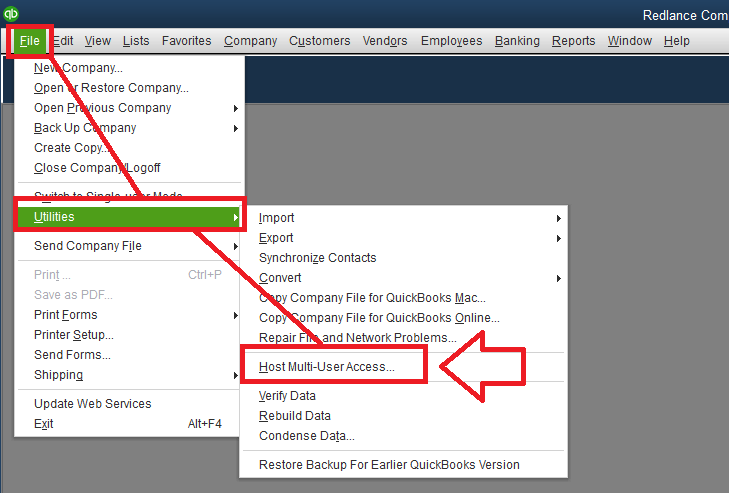
- Go to QuickBooks Desktop.
- Then tap on the File option and select Utilities.
- After that, choose Host Multi-User Access.
- At last, click on Yes to confirm.
Read More: Configure QuickBooks Firewall Ports & Security SettingsWhat Makes QuickBooks Enterprise Hosting Distinct from QuickBooks Enterprise Desktop and Online?
| Features | QuickBooks Enterprise Hosting | QuickBooks Enterprise Desktop | QuickBooks Online |
| Access Location | You can access it from anywhere through a secure cloud server. | Installed locally on a specific computer or office server. | Fully cloud-based and accessed through a web browser. |
| Data Storage | Data is kept on third-party hosted servers with backups. | Data is stored on local systems or internal servers. | Data is stored on Intuit’s cloud servers. |
| Multi-User Capability | Supports remote multi-user access without complex local network setup. | Multi-user access requires local network configuration. | Multi-user access is available, but with limited advanced features. |
| Customization & Add-ons | Supports Enterprise-level features with hosting flexibility. | Full Enterprise features, but limited to on-premise setup. | Limited advanced features compared to Enterprise versions. |
| IT Maintainance | The hosting provider manages server maintenance and backups. | We handle our own IT setup and maintenance. | Managed entirely by Intuit with minimal technical control. |
| Performance Control | High-performance dedicated servers improve speed and reliability. | Performance relies on local hardware capacity. | Performance depends on internet speed and browser environment. |
Pricing & Plans for QuickBooks Enterprise Hosting
When selecting a hosting plan for QuickBooks Enterprise, you need to consider the number of users, storage requirements, and overall business scalability. The pricing depends on the user count, offering flexibility for small teams and growing businesses. Here is a simplified breakdown of the commonly available standard plans:
| Plan type | Numbers of Users | Starting Price | Storage Allocation | Best Suitable For |
| Standard Plan 1 | 1-5 users | Starts from $33 per user/month | 5 GB per user | Small businesses or teams that need limited but secure remote access. |
| Standard Plan 2 | More than 5 users | Starts from $30 user\month | 5 GB per user | Growing businesses require multi-user collaboration. |
QuickBooks Enterprise Hosting Add-Ons That Are Supported
One of the biggest advantages of hosting QuickBooks Enterprise is the ability to integrate powerful third-party applications without being restricted to a single local system. Combining the right add-ons with hosted Enterprise improves reporting accuracy, automation, and overall operational efficiency. Here are some commonly supported and business-related integrations:
| Add-Ons | Description |
| Fishbowl Inventory | Enhances advanced inventory management, tracking, and warehouse control. |
| LeanLaw | Designed for law firms to manage billing, trust accounting, and legal time tracking |
| Method CRM | Syncs customer data to improve sales tracking and relationship management. |
| ACCtivate | Offers inventory distribution and supply chain management features. |
| Adobe Acrobat | Simplifiles document sharing and editing. |
| Bill.com & SmartVault | Streamlines bill payments and documentation storage. |
| Expensify | Automates expense tracking and reimbursement processes. |
| DocuSign | Enables secure digital signatures for approvals and contracts. |
| Salesforce | Connects accounting with sales operations for better data visibility. |
| Qvinci | Offers advanced financial reporting and multi-location insights. |
These add-ons allow us to customise our hosted QuickBooks Enterprise environment according to business needs.
Advantages of QuickBooks Enterprise Cloud Hosting
When you move to the cloud hosting QuickBooks Enterprise environment, you get access to more efficient accounting functions. It changes the way teams work, secure data, and positively expand business operations. Some of the main benefits are as follows:
- Remote Accessibility: You can access your QuickBooks Enterprise file from wherever you are, be it at home, travelling, or managing various office locations.
- Increased Data Protection: Secure connections and firewalls are used to encrypt the hosted environments. Active surveillance also exists to protect sensitive financial details.
- Real-Time Multi-User Collaboration: Multiple users can be allowed to work on a single company file simultaneously without any network restrictions.
- Automatic Data Backup: The option of automatic backups minimises the chances of data loss, which occurs because of system crashes or hardware failures.
- Growth Scalability: As your business grows, you can scale it up by adding new users and storage with only a few changes to your infrastructure.
Conclusion
We hope that you find this article insightful. We have tried to mention all the details about QuickBooks enterprise hosting so that you can use it in your business and be able to achieve your goals in less time. You can reach us at any time with any questions.